If Bowl App is available customers can then connect to the Bowl App application, see their game scores, take pictures and send them to the lane monitors.
In order to prevent unsuitable or offensive pictures to be displayed on the monitors they need to be approved by the bowling operators.
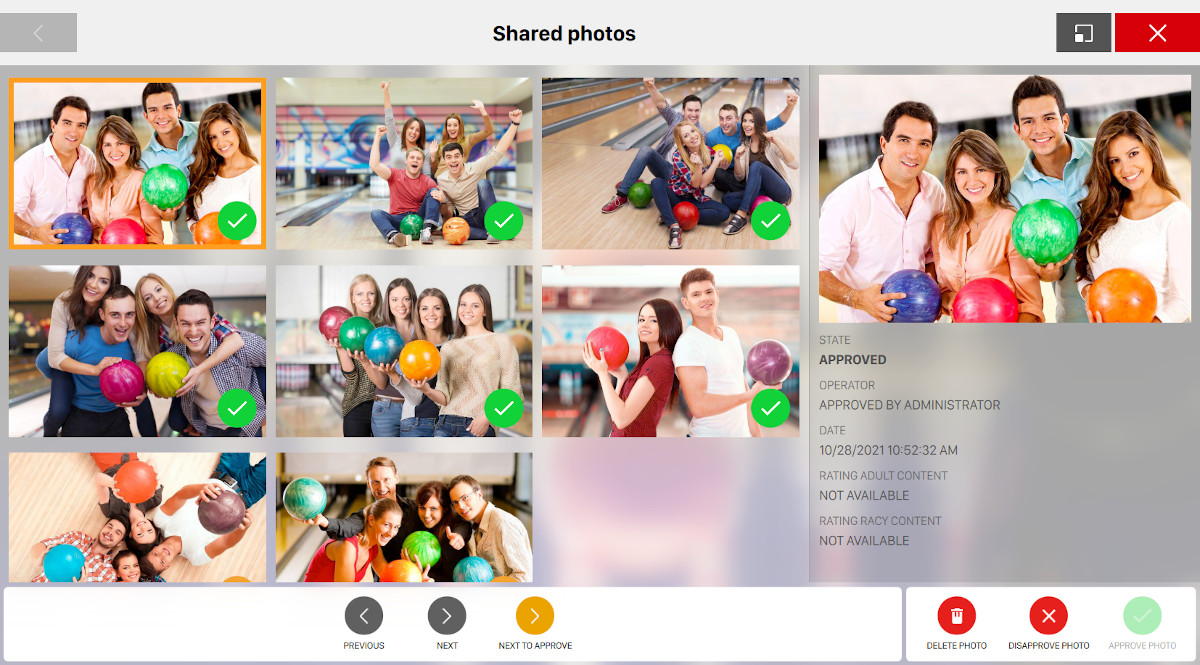
From the Shared Photos section of the software you can see the list of pictures taken by customers. You can select any image that you see on the list and approve, disapprove or delete it. Click on any picture of the grid: the right sidbar will display all the detail of the picture and some actions will appear on the bottom area:
-
Previous: move to the previous picture
-
Next: move to the next picture
-
Next to approve: move to the next picture that has to be approved
-
Delete photo: it deletes the photo from the archive
-
Approve photo: it allows the operator to approve the content of the picture and to show the picture on the monitors
-
Disapprove photo: it allows the operator to reject the content of the picture. The picture will be kept in the Share Photos archive but it will not be shown on the monitors
Each photo item contains the following details:
-
State: indicates the state of the picture
-
Approved
-
Not approved
-
Waiting for approval
-
-
Operator: the operator who approved or disapproved the photo
-
Date: the date and time the picture has been uploaded
-
Rating adult content: the automatic rating adult content calculated
-
Rating racy content: the automatic rating of racy content calculated
The threshold of tolerance for adult and racy content can be set from Preferences > Bowl App >
Automatic photo approval.