This window allows you to create and to manage the bowling and time games reservations.
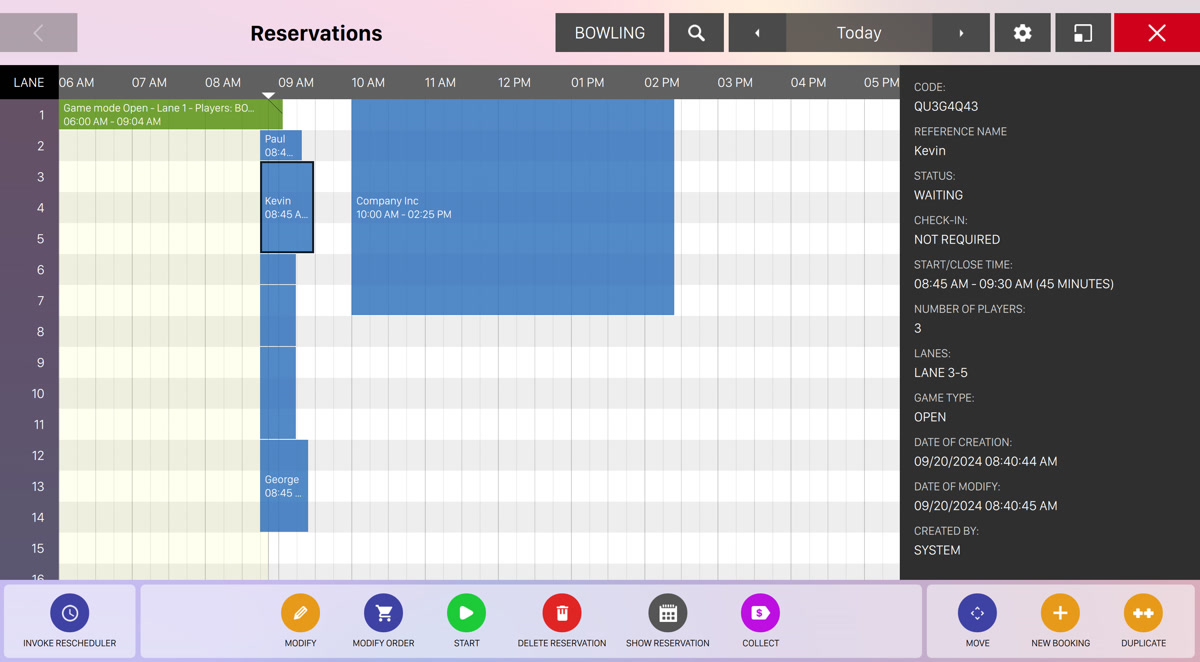
The main section of the window shows a grid with all the reservations, displayed with rectangles. The grid will display the hours of the day on the horizontal axis while on the vertical axis it will show the lanes on your bowling center. Each rectangle represents a reservation:
-
The width of the rectangle indicates the time duration of the reservation
-
The height of the rectangle indicates the number of lanes
Furthermore each rectangle is filled with a background color, which represents the reservation status:
-
Green: indicates that the reservation is related to a currently open game session
-
Gray: indicates that the reservation has been archived
-
Orange: indicates that the reservation is closed but has still some items to be collected and therefore is not archived yet
-
Light blue: indicates that the reservation has been created from the frontdesk and is ready to started
-
Red: indicates that the reservation is related to a league week
On the topbar you can find some actions to filter the reservations and customize the appearance:
-
Select if you want to see reservations related to bowling games or to time games’ categories. By default the value is Bowling and you can switch between different views by toggling the button and selecting the category you are interested from the dropdown list
-
Click on the search button to enter an arbitrary text and use it as search filter
-
Select the date. By default the page will show you the current day but you can switch to another date by selecting it from the calendar or navigate to previous or subsequent days by clicking on the arrow buttons
-
Click on the cog button to toggle the view settings
-
Set the horizontal and vertical zoom by dragging the sliders
-
Click on the statuses checkboxes to exclude reservations in a specific states:
-
Show reservations
-
Show started activities
-
Show collectable activities
-
Show archived activities
-
Show scheduled leagues
-
Show estimation
-
-
At the bottom area you can find a set of buttons with which it is possible to create / modify a reservation. Click on any reservation rectangle to select it. Depending on its status a list of buttons will appear:
-
Invoke rescheduler: click on this button to invoke the rescheduler procedure that will try to anticipate and reschedule all the reservations that are marked to be anticipated
-
Details: click on this button to see the details of a game if the reservation is started
-
Modify: click on this button to modify the game related to the reservation. This will take you to the bowling game management where you can set the players, teams, etc...
-
Modify order: click on this button to modify or add items to the order related to the reservation. This will take you to the order management page
-
Game settings: redirects you to the game settings window
-
Score: redirects you to the game score window
-
Move players: allows you to move the players of an existing game if the reservation has already started
-
Start: allows you to immediately start the reservation. This operation will require a confirmation and will check if there are enough lanes available
-
Delete reservation: if the reservation is not started allows you to delete the selected reservation
-
Show reservation: allows you to modify all the details of a reservation
-
Collect: allows you to collect all the items related to the reservation. This action will take you to the income table
-
Move: click this button to move the reservation to a different area of the grid
-
New booking: click this button to create a new reservation
-
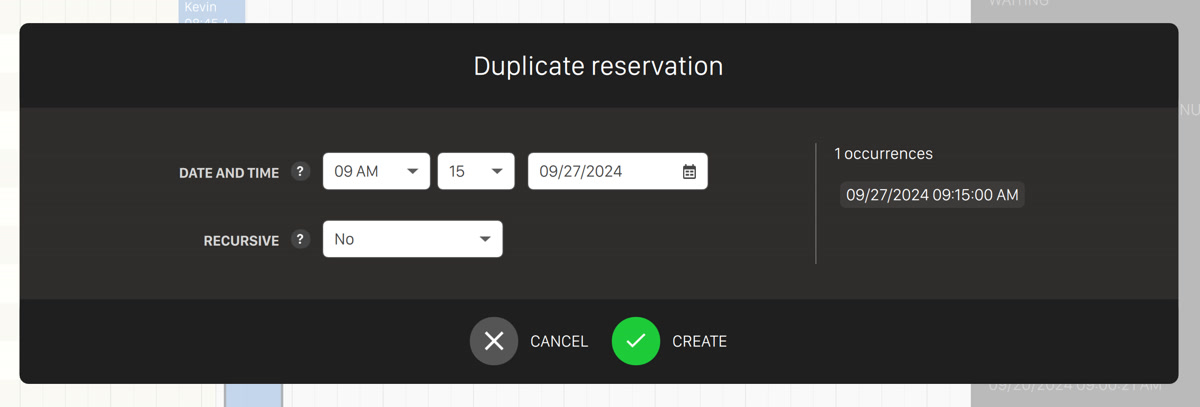
Duplicate: allows you to duplicate the selected reservation. This will open the duplicate reservation dialog:
-
Date and time: select the start date and time of the reservation
-
Recursive: allows you to create repeat reservation every week or every month
-
If you click on an existing reservation rectangle then a black sidebar will appear on the right, displaying all the details of the reservation:
-
Code: indicates the code of the reservation
-
Reference name: indicates the reference person of the reservation
-
Status: indicates a summary of the reservation status
-
Check-in: indicates whether the customer has to do the check-in or not
-
Start/Close time: indicates the date and time when the reservation starts and finish
-
Number of players: indicates the number of players of the reservation
-
Number of matches: indicates the number of matches of the reservation
-
Used lanes/games: indicates the amount of lanes or games used by the reservation
-
Game type: indicates the game type of the reservation, open or cross lane
-
Date of creation: indicates the date and time the reservation has been created
-
Date of modify: indicates the date and time the reservation has been updated
-
Created by: indicates the username of the operator that created the reservation
-
Created at: indicates the workstation from where the reservation has been created
11.1 Create a new reservation
To create a new reservation:
-
Press New booking button
-
Click on the grid to choose the starting time and the game or the lane where the reservation will be made
-
Hold the mouse button and drag until the duration is set and select how many games (or lanes) must be reserved. Once done release the mouse button
-
Set the reservation parameters on the Modify reservation mask
11.2 Move a reservation
It is possible to modify the start time of a reservation directly from the grid. To do this:
-
Select the reservation that you want to move
-
Press the Move button
-
Drag the reservation to the new position
-
Press Confirm
-
Cancel button allows you to move the reservation to the previous position
11.3 Create or modify a reservation
Go to the ‘Reservation Grid’, click on any reservation, click on "Show reservation" button or click on the new booking button from the reservation grid and draw the rectangle. The modify reservation dialog will appear:
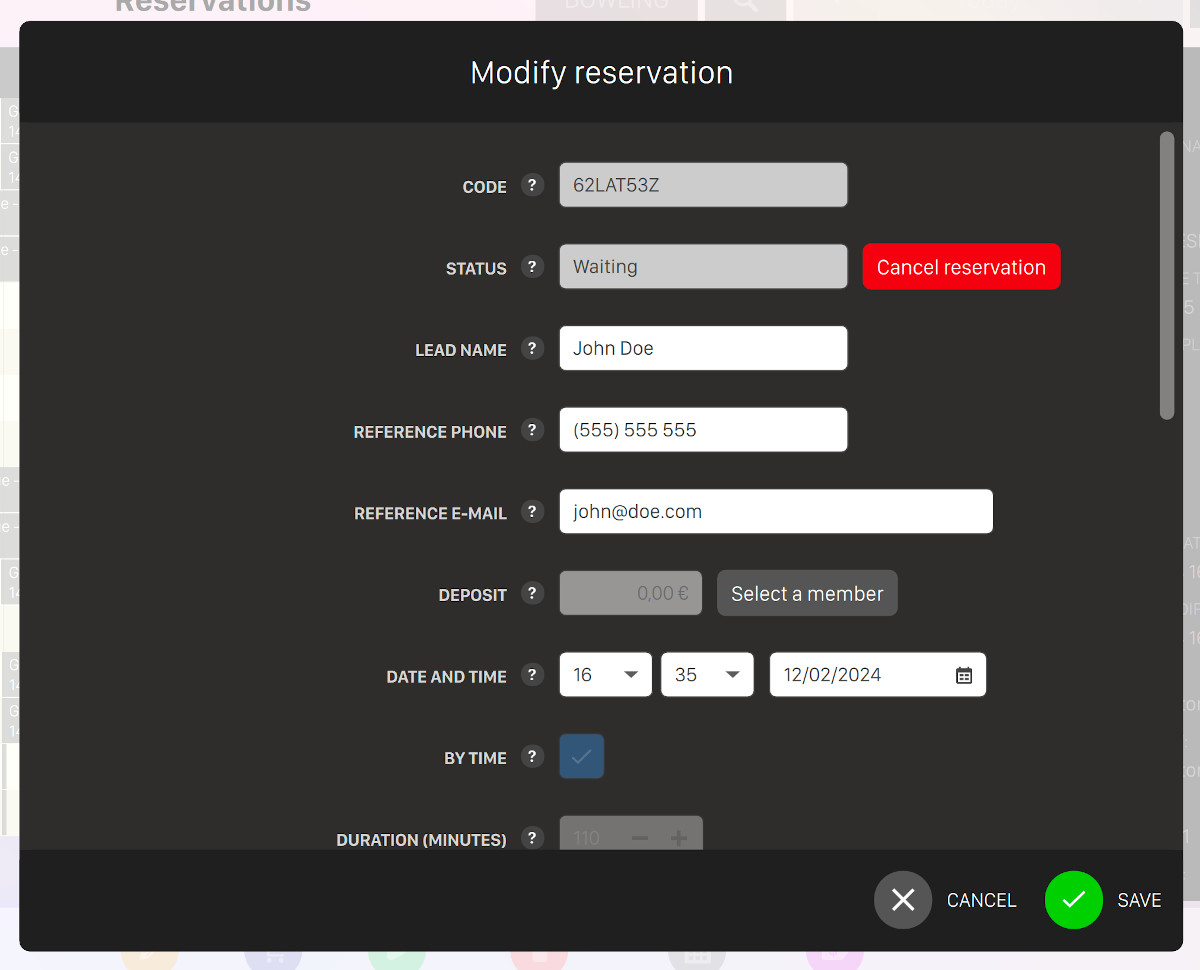
This window allows you to view and/or modify the information related to the reservation.
-
Code: represents a unique code of the reservation that is generated by the software
-
Status: indicates the current status of the reservation. Next to this information box you can see the Cancel reservation button that allows you to cancel the current reservation. A confirmation dialog will appear and you will be asked to confirm the action
-
Lead name: allows you to enter / change the name of the person the reservation belongs to
-
Color: allows you to set the color of the reservation, in order to quickly identify it on the grid
-
Reference phone: allows you to enter a reference phone for the person the reservation belongs to
-
Reference email: allows you to enter the reference email of the person the reservation belongs to
-
Deposit: this option is available only if you have selected an existing member from the list. In this case the player will deposit some money before starting the game. An account will be created for the customer who is creating the reservation. This account is called deposit account and will be automatically used by the system at payment time. The select a member button allows you to select a player from the member archive selection window
-
Date and time: allows you to set the reservation date and time
-
By time: allows you to enable the duration field
-
Duration: allows you to set how many minutes the reservation will last. When this option is disabled the duration field changes to ‘number of games’ and on the right it appears a preview of the estimated time for that reservation. This option is available only if the reservation is by time
-
Number of games: allows you to set how many games the players can bowl. This parameter is available only for the bowling department and if the reservation is not by time
-
Players name: allows you to set the names of the players
-
Game mode: allows you to set whether the game is in open or in cross lane mode
-
Lane number: allows you to choose the lane. This parameter is only available for bowling
-
Game number: allows you to choose the time game number. This parameter is available only for ‘time games’
-
Total used lanes: allows you to set how many lanes are used by the reservation. This parameter is available only for bowling department
-
Total used games: allows you to set how many games are used by the reservation. This parameter is available only for ‘time games’
-
First warning/second warning: allows you to set when the waiting messages related to this reservation appears on the front desk messages. It is possible to set up to 2 warnings for each reservation
-
Lane message: allows you to add a message that will be displayed on the score viewer some minutes before the reservation starts (the number of minutes can be configured from
Preferences > Advanced settings > Reservation settings -
Note: allows you to add some notes to the current reservation
-
Prepaid mode: activate the prepaid mode, in this case payment will be required before starting the reservation. This function is not compatible with "Start automatically" option
-
Waiting for check-in: indicates if the reservation’s start time can be delayed by the rescheduler
-
Allow to anticipate: indicates if the reservation’s start time can be anticipated by the rescheduler
-
Start automatically: indicates whether the reservation should start automatically without operator intervention. This function is not compatibloe with the "Prepaid mode" option
-
Reservation source: indicates the origin of the reservation
Click on the Save button to confirm the changes or on the cancel button to discard them.
11.4 Automatic Coupon Restoration
When a reservation is cancelled or deleted, the system automatically handles any coupons that were used for payment. This feature provides the following benefits:
-
Automatic restoration: Any coupons used to pay for the reservation are automatically restored to an unused state
-
Immediate availability: Restored coupons become immediately available for use in new reservations
-
No manual intervention: Staff members do not need to manually recreate or reissue coupons
-
Customer satisfaction: Customers can reuse their coupons without contacting staff or waiting for refunds
Example: If a customer uses a $20 coupon to book a reservation for Saturday evening but later needs to cancel due to unforeseen circumstances, the coupon is automatically restored. The customer can then use the same coupon to book a different time slot without any additional steps.